In this article:
Assigning work to your classes
Tip 1: Getting students logged in
If your school has access to a VLE/LMS, you can use it to help your students access their This is School accounts for the first time.
-
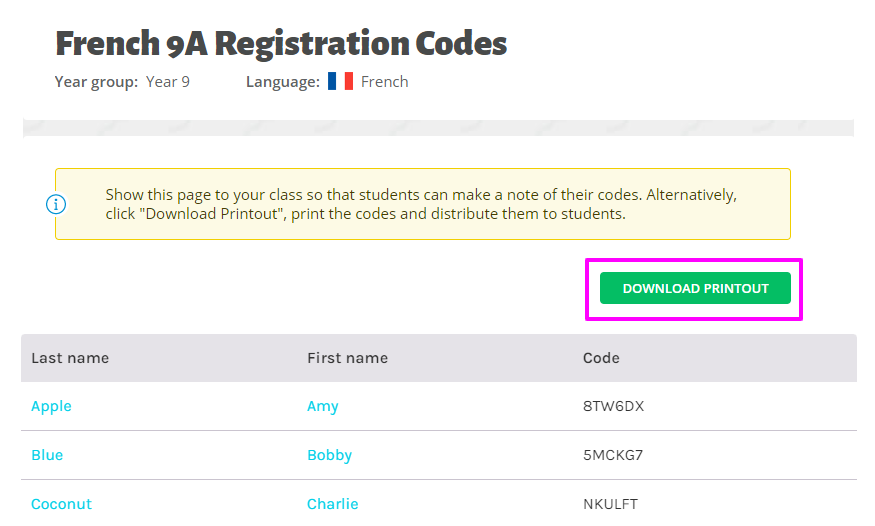
 Add your students and generate registration codes for them by following these steps.
 -
Download the PDF list of the registration codes.
-
Post the list on you VLE/LMS for students to see.

Tip 2: Share to Google Classroom
If you use Google Classroom, it couldn't be easier!
-
If you're the Primary Account Holder, head to your Settings page by clicking on your name top right. Check the box to Turn on Share to Google Classroom functionality.
-
Assign any video exercise to your class and then click the Share to Google Classroom button on the video page.
- Follow the steps to notify your students of the assignment via Google Classroom.
Not the Primary Account Holder? Ask your colleague to activate the Share button for you.
Tip 3: Assigning work to your classes
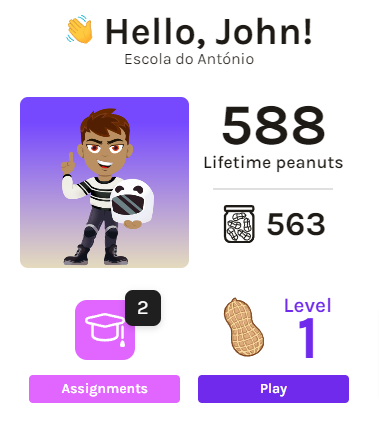
As soon as your students log into their my.thisisschool.com accounts they will see the work you've assigned to them, so all you need to do is:
-
 Post a message on your VLE/LMS like "Your homework for today is on thisisschool.com!"
 -
 When students log in, they'll see the work on their homepage: